SQLite and the new ABC SQLexecutor

Clarion 9 introduces a new driver for working with SQLite databases.  SQLite is one of the most widely deployed databases in use today. SQLite databases are widely used on both iOS and Android tablets and cell phones.  SQLite databases are useful in any situations where simplicity of administration and easy maintenance are more important than scalability.

The driver introduces a new prop; PROP:CreateDB. PROP:CreateDB is a command property that tells the SQL driver to create the SQLite physical database file that is specified in the OWNER attribute of the file. If the database file already exists, this command does nothing.  The existing database file will not be destroyed.

The CREATE statement converts Clarion data types to SQLite Data types using the following table:

Clarion Data Type SQLite Data Type
STRING CHAR
CSTRING VARCHAR
STRING(8);GROUP OVER(STRING);DATE;TIME DATETIME
DATE DATE
PDECIMAL NUMBER
DECIMAL NUMBER
BYTE TINYINT
SHORT SMALLINT
LONG INTEGER
SREAL FLOAT
REAL REAL
BLOB CLOB
BLOB,BINARY BLOB

However Clarion 9 introduces new ABC support so that you can easily deploy and execute SQL scripts. For example a create script like below;
CREATE TABLE Courses(
Number INTEGER,
Description CHAR(40),
CompleteDescription CLOB,
CONSTRAINT KeyNumber PRIMARY KEY (Number));
CREATE INDEX KeyDescription ON Courses(Description);

The new class executes SQL code as a series of commands separated by an end of statement marker which you specify.  Any errors encountered executing the script are reported using the passed error handler. In short, you provide an external file that contains your SQL script and its parsed and executed.  The SQL code isn’t limited to just Create and Alter database scenarios, you can execute any valid SQL code. And of course the new ABC SQL script support is applicable across any Driver and SQL backend.

Clarion 9 – Touch-enabled

Gartner is estimating that there will be 13 million enterprise tablet purchases next year, and 53 million by 2016. They predict that Windows 8 will grab 39 percent of the tablet market in 2016. You can be sure that you’ll have many users wanting to run your Clarion apps on their (Win8 Pro – x86 based) tablet.  And with the release of Clarion 9 you’ll be ready to deliver to them because the release of version 9 will add full touch support to the Clarion RTL.

Clarion 9 implements touch support into the ACCEPT loop with the addition of:

  • new event; EVENT:Pointer
  • new built-in function; POINTERDATA()
  • new SYSTEM property; PROP:PointerInterface

And any time a user swipes, taps, clicks, pinches, stretches or and zooms the screen with a finger,  when they release it an event (EVENT:Pointer) will fire.  The RTL retrieves the pointer info, ID, flags, and coordinates that were touched.  The PROP:PointerInterface allows you to specify your own optional handler of pointer events.

So how do you go about adding Touch support to a Clarion app?  Clarion developers won’t need to manually add any code to support touch. The C9 Templates will generate all the code needed to respond to touch gestures, so existing Apps will just need a regenerate with C9 to become touch-enabled.

Of course there are some UI considerations when designing your application for an optimal tablet experience. To help with that we’ll also be shipping:

  • New template “theme” that creates windows that look and feel like the Windows 8 UI
  • Touch-friendly sized buttons, menubars, etc.
  • New set of “Win8 styled” icons/images

As an example of touch-friendly design here are screen shots 3 new touch-friendly Date pickers that are already completed.

There are also some touch behavior considerations that have to be worked out.
For example defining what should happen on a Browse when its:

  • Swiped
  • Tapped
  • Clicked
  • Pinched
  • Stretched
  • Zoomed

With the input from the Clarion developer community we’ll be working on defining Browse/List behaviors, and behaviors for other controls and Template types during the beta phase of C9. Its very likely that we’ll make the behaviors Global Template settings so that you have final control as to how your application responds to touch gestures.

C8 ready for Win8 and more

A new release of C8 is on its way out. This release has been through an extensive test cycle, both internally, and working with many key Clarion developers. Most apps will see an immediate performance boost in screen/control drawing, especially when opening very complex windows, as well as a much cleaner rendering of closely spaced and overlapped controls.

Windows 8 is due to release next week, and we’ve added new support to the RTL, compiler, debugger and Templates, so you’ll be able to detect Win 8, and properly manifest your apps for Win 8.  All in all there are 100+ fixes/changes/features in this release, and with the lengthy test cycle this release has been through we’re confident you’ll be able to make use of them right away.

An updated release for C8 is on its way

A new update is going out today for Clarion 8.  This is a pretty significant release in that it has some important speed improvements for drawing complex windows. For this release we worked closely with a couple dozen Clarion devs testing their real-world windows using internal builds.  This was a win-win situation for all of us — we received immediate feedback as we released iterative changes to the RTL, and the developers who participated were able to test their biggest and baddest windows with the new RTL.

In a previous post I wrote about the changes we made for flicker suppression, but that’s only part of the story.  In addition we spent a lot of cycles working on improving the speed of opening and repainting complex windows, the elimination of extra sets of caption buttons being drawn by the OS into the App Frame, and a number of other MDI related issues.  The bottom line is that you’ll see a nice improvement in your Apps perceived performance, with just a recompile and no other changes (and its an improvement that your end users will surely notice).  The improvements to the RTL actually came from retro-fitting code being developed for Clarion 9 back into the C8 codebase.

Speed and flicker control aren’t the only items addressed in this release. There are also fixes and changes across the board from the IDE itself, template changes, drivers and more.

Flicker – zapped

We know that some users had a real issue with controls repainting under Win7 and causing an annoying “flicker”.  The problem was a side effect of a workaround we introduced to compensate for a change MS did for Aero support which started in Vista, and to many seemed to worsen to a large degree in Win7.  We’ve been working on it as a part of a much larger body of work for the entire window handling code (menu, MDI, SDI, et al). We recently sent out internal builds to a few users whose apps were “flickering” and giving them fits, and I’m happy to say that they’ve reported back with excellent results – one user was reportedly spontaneously dancing around the office after seeing the results on his app (and no, I won’t say who he or she is) but you’ll see it for yourself (or rather not see it :)) in the next release.

Tracking down those pesky GPFs

Coming up in the next C8 release we’ll be providing you with some help for tracking down those pesky GPFs.  We’ll be shipping two variants of the RTL; one the regular RTL, and the other RTL variant with some code added to read embedded debug info, and to decode the names of functions in the call stack and associated line number information.  The decoder-enabled RTL is a drop-in replacement, so you can just copy it over the standard RTL and that’s it.

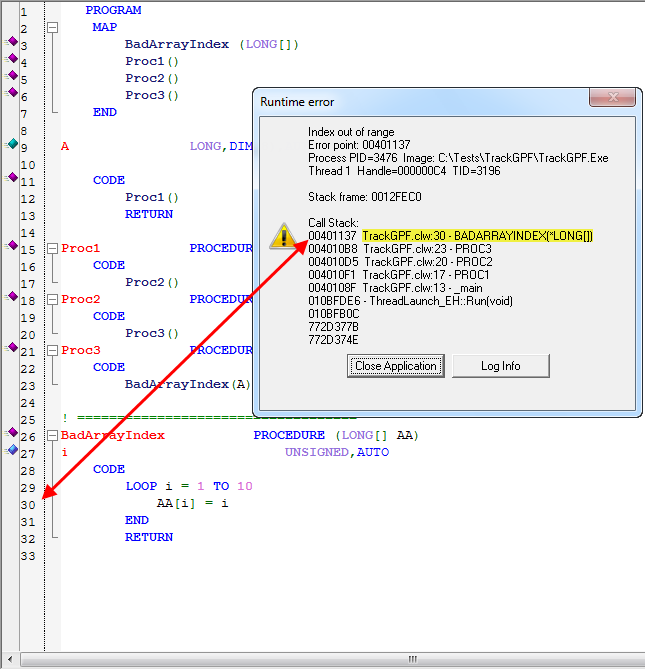
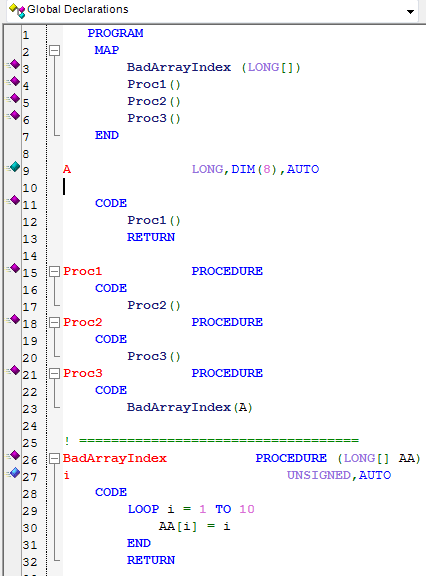
Let’s take a look at what it gives you, here is a simple program that creates a GPF

Program code to force a GPF

On line 9 we declared a LONG with 8 dimensions, but look at line 29,it’s not hard to accidentally introduce an error like this, and a lot harder to track it down when it only fails intermittently at a customer site.  This what we get if we run this program when compiled with debug info:

GPF with debug info decoded at runtime

As you can see our LOOP causes a GPF because it attempts to access a dimension that does not exist – but with the debug info decoded at runtime we immediately see exactly which line of code caused the problem, as well as seeing the entire call stack.  For those who like to stay away from long debug sessions (and who doesn’t) this will be very handy.  Your end-user can just press the “Log info” button and send you the log text file and then it’s ball in your court. 🙂

New functionality challenges new release

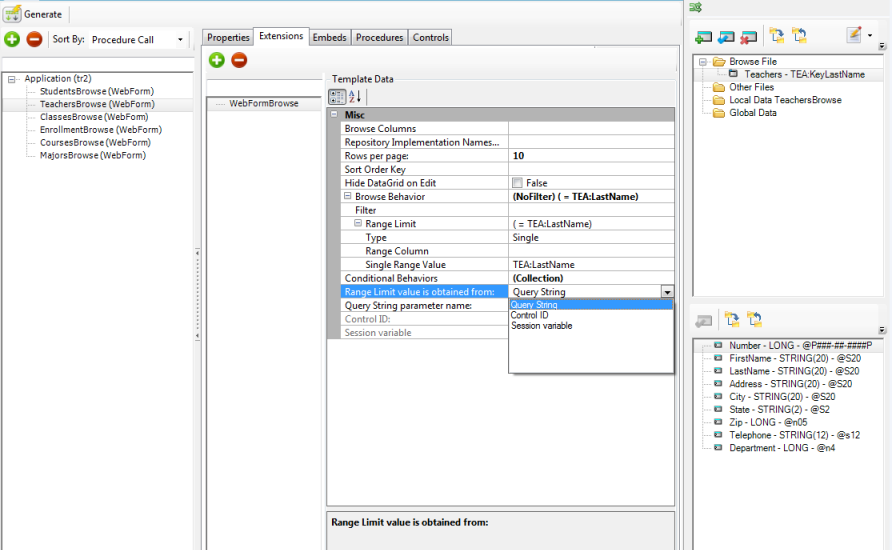
The new functionality I mentioned in the previous post took a bite out of our planned release timeline.  The functionality in question is the .Net implementation of our Win32 BrowseBox Behavior implementation.  We had aimed to have the support implemented across platforms (desktop/web) and across the data access models (ADO,Linq,FileDrivers).   This is what we have for the web side:

BrowseBox Behavior for the web


as you can see its very similar to what we have on the Win32 side of things.  For ASP.Net there are some new properties that are needed.  In particular we have to account for the stateless environment – each page access occurs as if it were the first time it has ever happened.   Hence the options for where the page will get its range limit value (as shown in the dropdown – and sure to expand shortly).

The BrowseBox Behavior implementation will bring a lot of code-free functionality to your web and desktop apps.  We’ll wrap this up tomorrow and release with whatever functionality exists (check the readme for the release state).

Another area where you’ll notice a huge improvement is the processing of the T4 template registry – it is now about 90% faster!

And we also have some nice news for the upcoming Win32 release but I’ll post about that tomorrow.

upcoming releases

We’re delaying the .Net release until Monday so that we can ensure a problem with the Linq model templates is fully resolved, and to hopefully have time to introduce some very useful new functionality across all 3 models (ADO.Net, Linq, ClarionDrivers).

We also have a new Win32 release planned for next week as well as updates to all the drivers and ReportWriter.

C8 update is out

A new release of C8 (build 8973) went out today.  Around 50-60 fixes, changes and improvements.  One of the new features was to implement support for PREVIOUS() for the ASCII and BASIC drivers; that means you can now easily drop ASCII/BASIC files into a Listbox control and “Browse” your text and CSV style files.

On the IDE side a few related new productivity features;
FEATURE: When selecting an image file in the window formatter you can now type in the name of the file and if it can be found via Redirection, the file will be used
FEATURE: When opening the file dialog in the window formatter for the first time the dialog will now open to the first directory where the file type would be found via the Redirection system
FEATURE: When re-opening the file dialog in the window formatter the dialog will now open to the last directory it was previously opened in.

We’re looking at other places where can use the Redirection system to make your programming more productive – have fun with the release.

News and releases

Last Friday (March 2nd) we did a ClarionLive webinar to share the progress on the T4 templates – in particular the ASP.Net templates and the LinqToFileProvider.  Diego also showed a .Net solution that utilized the managed code IP driver to talk with a ported version if the IPExtender class.  We’ll have an update FOR .Net released this week. You can see the recorded webinar at the ClarionLive site

We had planned to release a C8 update today – but ran into a very small problem (at the very last minute), its resolved now but we’ll do the release tomorrow.