C8 ready for Win8 and more

A new release of C8 is on its way out. This release has been through an extensive test cycle, both internally, and working with many key Clarion developers. Most apps will see an immediate performance boost in screen/control drawing, especially when opening very complex windows, as well as a much cleaner rendering of closely spaced and overlapped controls.

Windows 8 is due to release next week, and we’ve added new support to the RTL, compiler, debugger and Templates, so you’ll be able to detect Win 8, and properly manifest your apps for Win 8.  All in all there are 100+ fixes/changes/features in this release, and with the lengthy test cycle this release has been through we’re confident you’ll be able to make use of them right away.

An updated release for C8 is on its way

A new update is going out today for Clarion 8.  This is a pretty significant release in that it has some important speed improvements for drawing complex windows. For this release we worked closely with a couple dozen Clarion devs testing their real-world windows using internal builds.  This was a win-win situation for all of us — we received immediate feedback as we released iterative changes to the RTL, and the developers who participated were able to test their biggest and baddest windows with the new RTL.

In a previous post I wrote about the changes we made for flicker suppression, but that’s only part of the story.  In addition we spent a lot of cycles working on improving the speed of opening and repainting complex windows, the elimination of extra sets of caption buttons being drawn by the OS into the App Frame, and a number of other MDI related issues.  The bottom line is that you’ll see a nice improvement in your Apps perceived performance, with just a recompile and no other changes (and its an improvement that your end users will surely notice).  The improvements to the RTL actually came from retro-fitting code being developed for Clarion 9 back into the C8 codebase.

Speed and flicker control aren’t the only items addressed in this release. There are also fixes and changes across the board from the IDE itself, template changes, drivers and more.

Flicker – zapped

We know that some users had a real issue with controls repainting under Win7 and causing an annoying “flicker”.  The problem was a side effect of a workaround we introduced to compensate for a change MS did for Aero support which started in Vista, and to many seemed to worsen to a large degree in Win7.  We’ve been working on it as a part of a much larger body of work for the entire window handling code (menu, MDI, SDI, et al). We recently sent out internal builds to a few users whose apps were “flickering” and giving them fits, and I’m happy to say that they’ve reported back with excellent results – one user was reportedly spontaneously dancing around the office after seeing the results on his app (and no, I won’t say who he or she is) but you’ll see it for yourself (or rather not see it :)) in the next release.

Tracking down those pesky GPFs

Coming up in the next C8 release we’ll be providing you with some help for tracking down those pesky GPFs.  We’ll be shipping two variants of the RTL; one the regular RTL, and the other RTL variant with some code added to read embedded debug info, and to decode the names of functions in the call stack and associated line number information.  The decoder-enabled RTL is a drop-in replacement, so you can just copy it over the standard RTL and that’s it.

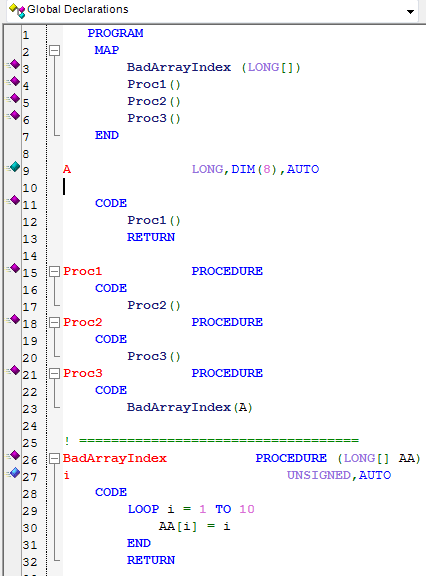
Let’s take a look at what it gives you, here is a simple program that creates a GPF

Program code to force a GPF

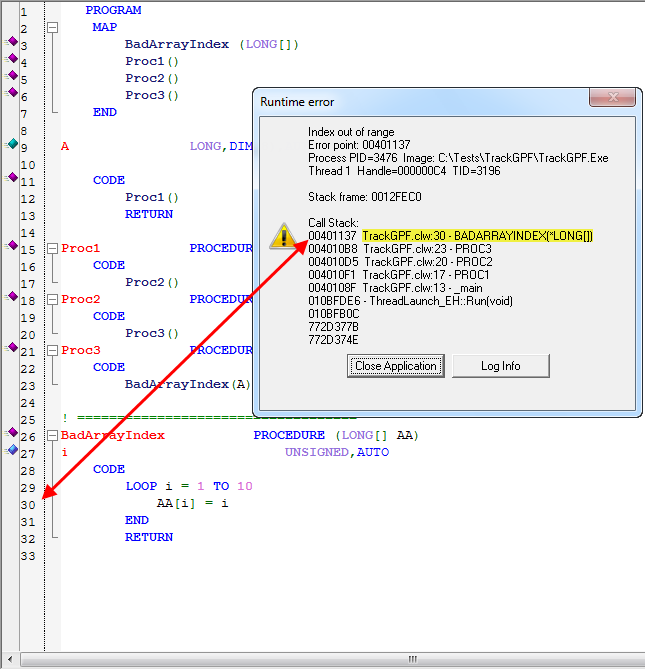
On line 9 we declared a LONG with 8 dimensions, but look at line 29,it’s not hard to accidentally introduce an error like this, and a lot harder to track it down when it only fails intermittently at a customer site.  This what we get if we run this program when compiled with debug info:

GPF with debug info decoded at runtime

As you can see our LOOP causes a GPF because it attempts to access a dimension that does not exist – but with the debug info decoded at runtime we immediately see exactly which line of code caused the problem, as well as seeing the entire call stack.  For those who like to stay away from long debug sessions (and who doesn’t) this will be very handy.  Your end-user can just press the “Log info” button and send you the log text file and then it’s ball in your court. 🙂

New functionality challenges new release

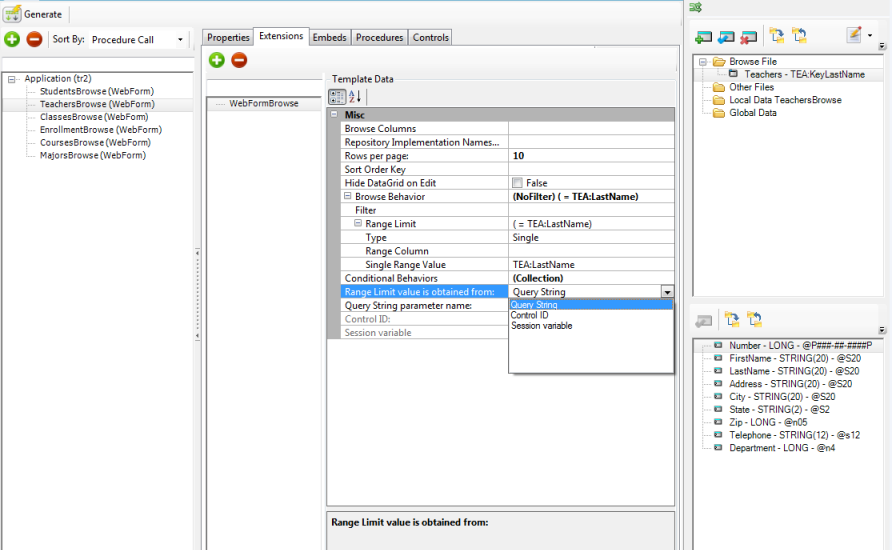
The new functionality I mentioned in the previous post took a bite out of our planned release timeline.  The functionality in question is the .Net implementation of our Win32 BrowseBox Behavior implementation.  We had aimed to have the support implemented across platforms (desktop/web) and across the data access models (ADO,Linq,FileDrivers).   This is what we have for the web side:

BrowseBox Behavior for the web


as you can see its very similar to what we have on the Win32 side of things.  For ASP.Net there are some new properties that are needed.  In particular we have to account for the stateless environment – each page access occurs as if it were the first time it has ever happened.   Hence the options for where the page will get its range limit value (as shown in the dropdown – and sure to expand shortly).

The BrowseBox Behavior implementation will bring a lot of code-free functionality to your web and desktop apps.  We’ll wrap this up tomorrow and release with whatever functionality exists (check the readme for the release state).

Another area where you’ll notice a huge improvement is the processing of the T4 template registry – it is now about 90% faster!

And we also have some nice news for the upcoming Win32 release but I’ll post about that tomorrow.

upcoming releases

We’re delaying the .Net release until Monday so that we can ensure a problem with the Linq model templates is fully resolved, and to hopefully have time to introduce some very useful new functionality across all 3 models (ADO.Net, Linq, ClarionDrivers).

We also have a new Win32 release planned for next week as well as updates to all the drivers and ReportWriter.

C8 update is out

A new release of C8 (build 8973) went out today.  Around 50-60 fixes, changes and improvements.  One of the new features was to implement support for PREVIOUS() for the ASCII and BASIC drivers; that means you can now easily drop ASCII/BASIC files into a Listbox control and “Browse” your text and CSV style files.

On the IDE side a few related new productivity features;
FEATURE: When selecting an image file in the window formatter you can now type in the name of the file and if it can be found via Redirection, the file will be used
FEATURE: When opening the file dialog in the window formatter for the first time the dialog will now open to the first directory where the file type would be found via the Redirection system
FEATURE: When re-opening the file dialog in the window formatter the dialog will now open to the last directory it was previously opened in.

We’re looking at other places where can use the Redirection system to make your programming more productive – have fun with the release.

News and releases

Last Friday (March 2nd) we did a ClarionLive webinar to share the progress on the T4 templates – in particular the ASP.Net templates and the LinqToFileProvider.  Diego also showed a .Net solution that utilized the managed code IP driver to talk with a ported version if the IPExtender class.  We’ll have an update FOR .Net released this week. You can see the recorded webinar at the ClarionLive site

We had planned to release a C8 update today – but ran into a very small problem (at the very last minute), its resolved now but we’ll do the release tomorrow.

Webinar this Friday (Feb 24)

This weeks ClarionLive webinar will focus on quickly putting any of your data onto the web, without knowing (or using) any ADO.Net, and with minimal ASP.Net knowledge.  This expansion on the ASP.Net templates uses your Clarion Dictionary to specify which tables to offer up over the web, and uses the Clarion database drivers for all file access.  This means you can put your .TPS file data and other ISAM data into reach for remote users.  Of course you can use any Clarion drivers, so your SQL data plays equally well. This webinar will focus on using the templates, but we’ll reserve a little time at the end to answer questions regarding writing T4 templates.

If we have sufficient time we’ll show a couple of new features in C8, and then we may have time to ask  webinar attendees a few questions to regarding Windows 8.

The next C8 release is still going through internal testing, and is also out in the hands of several external beta testers.  If the feedback is good, we’ll release it this coming Friday.  We’ll definitely be releasing a new Clarion.Net build with the latest fixes and enhancements to the T4 AppGen (and the latest templates) this coming Friday.

What’s coming up

We’re currently working on updates for both Clarion 8 and Clarion.Net.  On the C8 side we’re focusing on the first maintenance release for 2012 – lots of bug fixes and some popular feature requests.  On the .Net side we’re working on the next iteration of the 3-tier templates for both desktop and ASP.Net apps.  Additionally we’re adding the option to use the Clarion LINQ provider as the data model, bringing in ABC-like FILE access to your TPS (and other ISAM) tables.  We’ve simplified the steps needed to create the 3-tier app such that running the wizard creates both the model and the base application – and attaches all required extensions automatically.  End result – you won’t have to do much more than just select your Dictionary and then select the data model.  And if you choose the Clarion.Linq model there is no ADO.Net connection to configure.

We expect to release C8 next week to external testers, and a general release to follow the week after.  We’ll be ready to release the updated T4 templates around the same timeline, and once we’ve firmed up the changes we’ll schedule a webinar on ClarionLive.  The webinar will focus on how to use the templates (as opposed to how to write T4 templates).