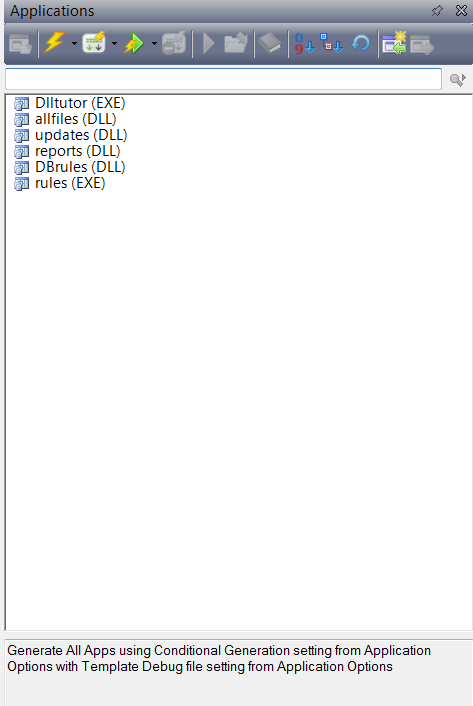
C9 uses an updated format for .App files. The upgrade happens when you first open an .App file, and is automatic. But because the new format makes it impossible to open that .App in a previous version of Clarion, the IDE prompts you to confirm you want the .App converted to the new format. This is all fine and good, but if you (as many do) have a Solution file that has 20 to -30 or 40+ .App files in it, you would in the past have to confirm upgrading every .App file, whereas C9 offers you this dialog, which allows you to confirm one time for every .App in that Solution.
C9 – Dictionary Search
The Dictionary Editor search functionality allows you to search within a selected Dictionary entity , or all of the Dictionary entities (Tables/Columns/Keys/Relations/Pool Fields and Global Fields).

The Search allows you to match any property for the entity you are interested in, for example when searching against Tables, you can search against Name, Description, Prefix, Driver, Driver Options, Owner, Full Path, Create, Encrypt, Bindable, Creation date and Modified date.
You can also build very complex searches that combine multiple conditions. The screenshot above is an example of a multi-condition search, where we are searching all fields for the presence of “ID” and where the data types is not a LONG.
C9 – Menu Shortcuts
C9 – Locate Applications
Clarion 9 beta – 3rd party vendors who ship binaries without source code
Clarion 9 is going into initial beta testing on Monday – Due to substantial internal changes and optimizations to the core RTL any 3rd party vendors who ship binaries without source code need to rebuild those binaries. So while we already have many 3rd party vendors already on our “alpha/beta” list we probably don’t have everyone, so if you fall into the category of “3rd party vendors who ship binaries without source code” please email support AT softvelocity dot com and request access to the initial C9 beta.
Changes to Template built-in symbols in C9
As part of the ongoing work and evolution of the Win32 AppGen, and based on numerous requests the following template symbols are now built-in (as opposed to defined at the template level):
%Parameters – single, dependent from %Procedure
The full list of a procedure’s formal parameters separated by commas and enclosed in parentheses unless empty
%ProcedureParameterName – multi, dependent from %Procedure
The list of names of all formal parameters as entered in %Parameters symbols; if missing then the name of that parameter as in %Prototype symbol is returned; if that is missing too, an AppGen generated name is returned
%ProcedureParameterOrigName – single, dependent from %ProcedureParameterName
The name of the parameter as entered in the %Prototype symbol
%ProcedureParameterType – single, dependent from %ProcedureParameterName
The type of the parameter as entered in the %Prototype symbol (without the CONST keyword and square brackets for array types)
%ProcedureParameterDefault – single, dependent from %ProcedureParameterName
The default value of parameters as entered in the %Prototype symbol
%ProcedureParameterOmitted – single, dependent from %ProcedureParameterName
Returns %True if the parameter is declared as omittable in the %Prototype symbol
%ProcedureParameterByReference – single, dependent from %ProcedureParameterName
Returns %True if the parameter’s type is declared with leading * in the %Prototype symbol
%ProcedureParameterConstant – single, dependent from %ProcedureParameterName
Returns %True if the parameter’s type is declared with the CONST keyword in the %Prototype symbol
And a new built-in symbol has been introduced into C9:
%ProcedureParameterDIMs – single, dependent from %ProcedureParameterName
Returns the number of dimensions if the parameter’s type is declared as an array in the %Prototype symbol (1 for [] , 2 for [,] , etc.)
The updated Application Generator reads TXA files produced by earlier Clarion versions. TXA files produced by the C9 AppGen can’t be read by previous versions.
These changes will be useful to all who write templates, but will benefit everyone and the visual change you’ll all immediately see is
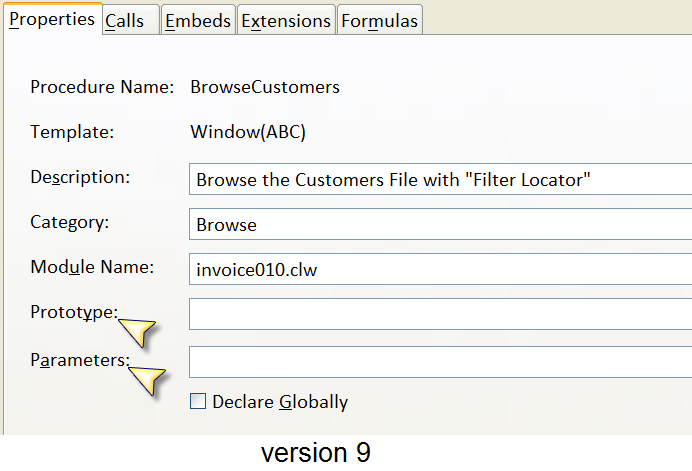
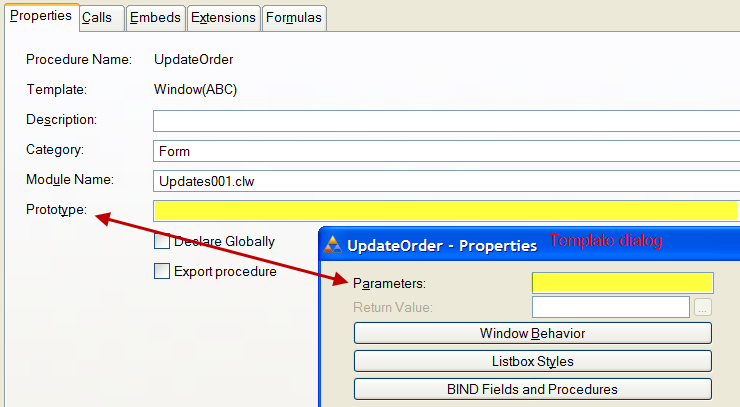
In C8 the Parameters entry field is located inside the Procedure’s Actions dialog, whereas in C9 they are now moved to the Procedure Properties main dialog.
Clarion-H5
The options to provide access to your Clarion program on non-PC devices now range from using RDP products, creating pure Web apps, or with @Thin or ClarioNet. And we’re going to be offering some more options for Clarion9 and Clarion.Net.
Today I’m writing about a new product (internally named H5 Builder). H5 is a blend of the best features of Internet Connect (IC) and Web Builder (WB), joined with the jQuery family and HTML5/CSS. Both IC and WB were products ahead of their time. As an example IC was using an async data packet methodology to refresh client side pages before technologies like Ajax were on the drawing board. With the addition of a global template both IC and WB allowed Clarion apps to run over the internet without (hardly) any work at all from the developer. Drop in the template, remake the app, and deploy. However, they both had the same limitations; difficult (or impossible) to work with the web UI presentation to fit within existing web sites, and they required IIS experience. They also weren’t positioned properly. Developers who tried to use either product to create a “web site”, or create a web app that needed to scale to 100’s-1000’s of simultaneous users found neither could meet their requirements.
Flash forward to today and H5. The intended use for H5 is not to create a “web site”, nor to create a highly scalable web app. Instead H5 is positioned to make it dirt simple to make your app available as a private web app for a given business/enterprise via a web browser, whether that’s on a PC or on a smartphone/tablet. And it’s built upon today’s standards for the web; HTML5, CSS3, and JavaScript. These standards are open, secure, and efficient, and they allow developers and web designers to create apps that look modern, can fit into existing sites (sharing CSS styles) and can run on modern devices like phones and tablets.
H5 apps use the jQuery library, either jQuery UI or jQuery Mobile (UI), and JSON for updating client side data without a full page refresh. They run under the AppBroker SE, so you just install the service and deploy — no IIS knowledge required.
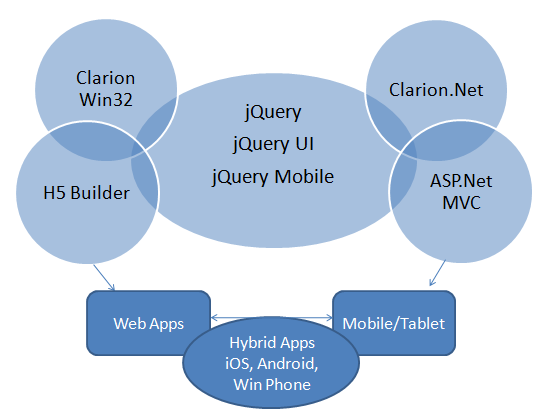
The use of the jQuery family of technologies will be shared with Clarion.Net. So becoming proficient with one group of technology will lead to being able to create web apps, mobile apps, native apps and hybrid apps.
New C8 update is on its way
A new update is going out today for Clarion 8 so keep a watch on your email for download instructions. There are improvements, fixes and changes across the board; from the IDE itself, template updates, driver fixes, and more, including code to resolve selection of really long (mostly identical) printer names.
News (short version)
I was working on a much longer post when I was alerted that if I didn’t post something (anything) real soon, then some heads were going to explode 🙂 —
so here is the shortest version I could quickly come up with, and I’ll follow with several small-ish posts.
On the Win32 side:
Expect a new release of Clarion8 out this week – possibly later today if all goes according to plan. Clarion9 is getting close to where we’ll release it to
an initial group of alpha testers, that being a precursor to widespread beta and official release.
On the .Net side
Clarion.Net is being updated to .Net 4.x compatibility, while still maintaining support for earlier .Net versions. It seems most of our developers are strongly interested in more capabilities to share code between .Net and Win32, and we’re working on further improvements in that area (we already support a builtin system for exposing .Net assemblies to Win32). With the push towards mobile and tablets, we’re working on templates that can address that very real need.
As we all know MS has an established history of pushing a new technology as the next “big thing” and then sweeping it under the rug a few years later. We don’t know if Microsoft will back off its Windows 8 strategy in the near future, or a few years down the road (like Zune and Silverlight). But after following MS down the path of WebForms, WinForms and Compact Forms only to have them mostly killed by MS, we’re avidly avoiding the MS trail of dead technology.
So in closing I want to suggest that jQuery, jQuery UI and jQuery Mobile(touch-optimized version of the jQuery framework) for smartphones and tablets will allow you to create a single app that can run on all popular smartphone and tablet devices (and desktop platforms). jQuery supports iOs, Android, Windows Phone, BlackBerry, Symbian, Palm webOS and other devices. So how does that fit into Clarion.Net and Clarion Win32? Well I’ll have to explain that in a separate post.
SQLite and the new ABC SQLexecutor
Clarion 9 introduces a new driver for working with SQLite databases. SQLite is one of the most widely deployed databases in use today. SQLite databases are widely used on both iOS and Android tablets and cell phones. SQLite databases are useful in any situations where simplicity of administration and easy maintenance are more important than scalability.
The driver introduces a new prop; PROP:CreateDB. PROP:CreateDB is a command property that tells the SQL driver to create the SQLite physical database file that is specified in the OWNER attribute of the file. If the database file already exists, this command does nothing. The existing database file will not be destroyed.
The CREATE statement converts Clarion data types to SQLite Data types using the following table:
| Clarion Data Type | SQLite Data Type |
| STRING | CHAR |
| CSTRING | VARCHAR |
| STRING(8);GROUP OVER(STRING);DATE;TIME | DATETIME |
| DATE | DATE |
| PDECIMAL | NUMBER |
| DECIMAL | NUMBER |
| BYTE | TINYINT |
| SHORT | SMALLINT |
| LONG | INTEGER |
| SREAL | FLOAT |
| REAL | REAL |
| BLOB | CLOB |
| BLOB,BINARY | BLOB |
However Clarion 9 introduces new ABC support so that you can easily deploy and execute SQL scripts. For example a create script like below;
CREATE TABLE Courses(
Number INTEGER,
Description CHAR(40),
CompleteDescription CLOB,
CONSTRAINT KeyNumber PRIMARY KEY (Number));
CREATE INDEX KeyDescription ON Courses(Description);
The new class executes SQL code as a series of commands separated by an end of statement marker which you specify. Any errors encountered executing the script are reported using the passed error handler. In short, you provide an external file that contains your SQL script and its parsed and executed. The SQL code isn’t limited to just Create and Alter database scenarios, you can execute any valid SQL code. And of course the new ABC SQL script support is applicable across any Driver and SQL backend.