Category Archives: RTL

Clarion 12 Beta: USTRING Returns (ANSI + Unicode)

What’s shipping in the mid-January beta

In mid-January we’ll be releasing a Clarion 12 beta that brings back USTRING.

TL;DR

  • Clarion 12 beta (mid-January) reintroduces USTRING.
  • USTRING is updated to handle both ANSI and Unicode strings.
  • A Clarion 12 maintenance update for the current shipping release will be published at the same time.
  • The beta is intended for side-by-side installation in a separate folder.
  • This beta focuses on predictable behavior and clearer intent in string handling.
  • You can evaluate the change incrementally before the next full release.

Also shipping: Clarion 12 maintenance update

At the same time as the beta, we’ll also be releasing an updated maintenance build for the current shipping version of Clarion 12.

Install notes (side-by-side)

The Clarion 12 beta is intended to be installed into a separate folder so you can keep your production Clarion 12 install intact and evaluate the beta side-by-side.

Why USTRING is back

Clarion developers care about two things when it comes to string handling: correctness and stability. In Clarion 12 we explored making Unicode capability available through the existing STRING type with a strong emphasis on minimizing impact to existing code. Since then, we’ve continued testing and listening to practical, real-world feedback about how developers want to work with strings.

The mid-January beta takes a more explicit approach: USTRING returns, and has been updated to handle both Unicode strings and regular ANSI strings.

What this means for day-to-day development

  • Clearer intent: USTRING makes it obvious (at the declaration level) that a value may be Unicode-aware.
  • Practical compatibility: USTRING is designed to work with both ANSI and Unicode content, so you can adopt it where it makes sense.
  • Incremental evaluation: You can test this beta in focused areas first (utilities, import/export, API edges, UI text, etc.).

Impact and rollout

This is a beta release, so the goal is to give you something you can run against real applications and real data. If you have areas of your app that are particularly string-heavy (parsing, formatting, concatenation, report output, external integrations), those are the best candidates for early testing.

Your feedback is what helps us validate the edge cases and ensure this lands in a way that improves the day-to-day experience for Clarion developers.

What’s next

We’ll follow up with more concrete notes as the beta is delivered (including any implementation details and feedback from early testers). The direction is straightforward: keep Clarion development productive today while continuing to modernize the foundations for what comes next.

We’re excited to start the new year with both the beta release and a maintenance update release for the shipping version of C12. If you try this beta, let us know what you think — and stay tuned, there’s more to come.

Merry Christmas from SoftVelocity!

And Thank you for all the support this year!

Clarion 12 – Upcoming release

Embracing the Future

We’re excited to announce the upcoming release of Clarion 12. While the release timeline has extended beyond our initial projections, we’ve used this additional development time to implement improvements that will benefit our entire developer community.

A significant improvement emerging from this extended development period involves our string handling architecture. While we had previously announced the introduction of a USTRING type to handle Unicode alongside the traditional STRING type for ANSI strings, we’ve arrived at a more elegant solution. Clarion 12 will feature a unified, enhanced string type that provides superior Unicode support while maintaining complete backwards compatibility. This streamlined approach not only simplifies development but also paves the way for an easier transition to 64-bit compilation in the future.

Beyond this architectural refinement, much of Clarion 12’s development has focused on building a solid foundation for future capabilities. We’ve made important internal improvements that, while not immediately visible, strengthen the platform’s core and prepare it for upcoming features.

Introducing AI-Powered Development

Clarion 12 marks our entry into AI-assisted development with a flexible, pragmatic approach. While our initial focus was on local LLM integration, we’ve built the system to accommodate any external LLM as we progress. During testing, we recognized that even machines well-suited for traditional software development might not handle local LLM processing efficiently. We’ve conducted extensive experiments with the LLaMA 3 series and various smaller models as local options, keeping the default choice flexible to accommodate different development environments.

This isn’t just another code completion tool – it’s a comprehensive coding assistant that truly understands (with your help) your application’s context and needs. For developers who prefer or require cloud-based solutions, we’ll also offer commercial AI integration options. This dual approach ensures everyone can access these powerful features, regardless of their local hardware capabilities.

Business AI: Today and Tomorrow

Clarion 12 introduces AI capabilities starting with practical IDE enhancements that streamline your development process. This is just the beginning of our AI journey. Just as websites became essential for business success in the 1990s, AI integration in business applications is becoming crucial for maintaining competitive advantage today. We’re laying the groundwork for you to capitalize on this opportunity.

Current IDE Intelligence

In this release, Clarion 12 includes AI tools to analyze your existing applications and suggest potential enhancements:

  • Comprehensive application scanning and analysis
  • Intelligent feature recommendations based on your specific business domain
  • Vector database creation for deep application understanding
  • AI-powered development assistance and code insights

Future Application AI

In upcoming releases, you’ll be able to integrate AI directly into your business applications:

  • Ready-to-use semantic search capabilities
  • Vector database integration with standard SQL databases
  • AI features that don’t require machine learning expertise
  • Templates and frameworks for easy AI integration into your applications

This phased approach ensures you can start benefiting from AI immediately in your development process while preparing for the next wave of AI-enhanced business applications.

System Requirements

For local AI features:

  • Minimum 16GB RAM
  • Modern CPU (12th gen Intel or AMD Ryzen 7000 series or newer recommended)
  • Windows 11 recommended (Windows 10 compatible but not officially supported for all AI features)

Standard Clarion development requirements remain unchanged for non-AI features

Looking Ahead

The release of Clarion 12 represents more than just an update – it’s a strategic step toward empowering our development community with next-generation capabilities. By focusing on practical AI implementation and maintaining our commitment to efficient business application development, we’re ensuring that Clarion developers are well-positioned to meet evolving market demands.

The release will be available before year-end, with updated documentation. We are also pushing hard to complete additional training resources, including videos and detailed blog posts, to help you make the most of these new capabilities. We’re exploring the possibility of featuring Clarion 12 on the ClarionLive channel. Stay tuned for specific release date announcements and early access opportunities.

Get Ready

We encourage all developers to begin planning their upgrade to Clarion 12. The improvements in this release, combined with the foundational work for future enhancements, make this a crucial upgrade for staying competitive in today’s rapidly evolving software development landscape.

Clarion 7.2 – Menus

We’re getting Clarion 7.2 ready for release, and I thought I’d make a few posts and talk about the changes and new features. Version 7 already has support for creating a very nice UI on your menu’s, and we recently added a couple new menu styles and support for using a 3d vertical separator. Using the Menu Styles lets you provide the exact same UI for your menu’s across all supported operating systems. No matter what OS your application is deployed on you have complete control of the menu colors and overall style.

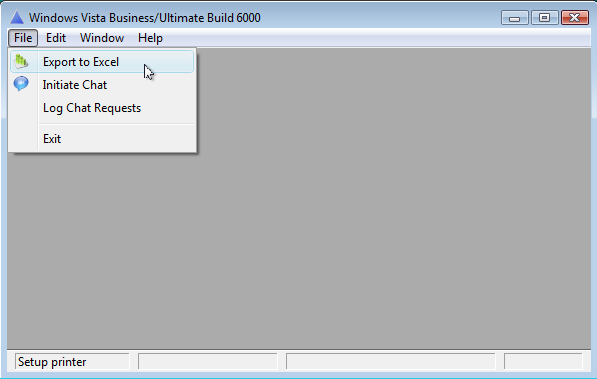
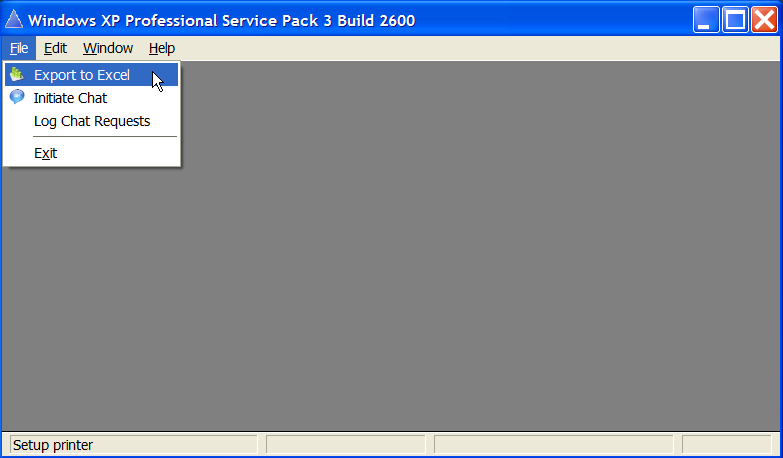
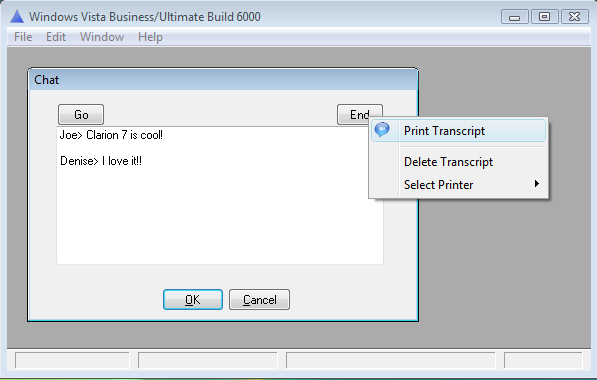
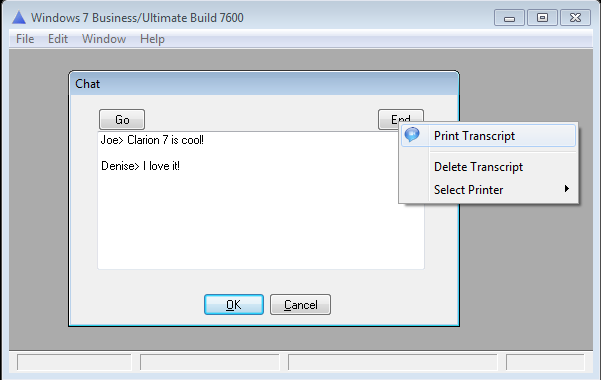
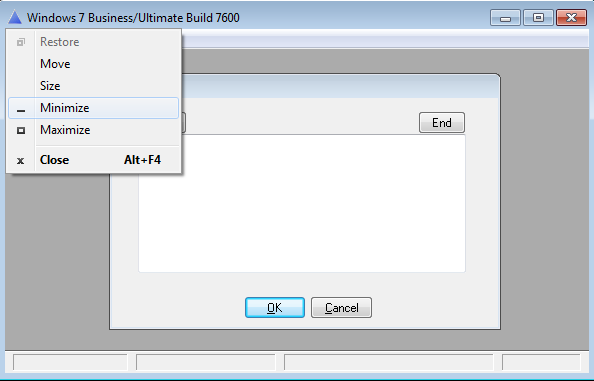
Now in 7.2 we’ll introduce new support to make your applications use the OS menu’s. The new support doesn’t use the MenuStyleManager class, its only requirement is that your App is properly manifested, and with that your menus will match the menus on the users operating system. Here are some screen shots taken from different operating systems.

osmenuwin7

osmenuvista

osmenuxp

ospopupvista

ospopupwin7

ossystemmenuwin7

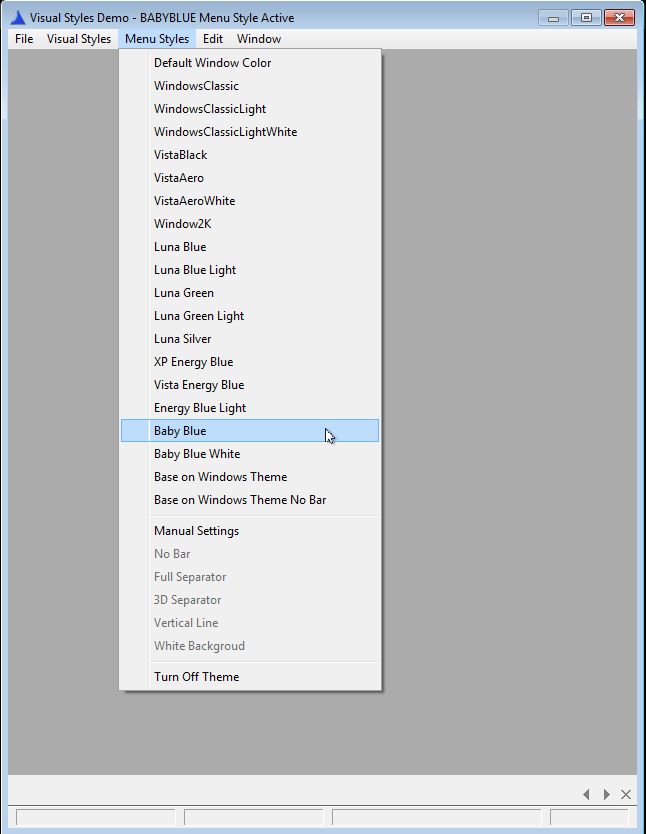
and for those who prefer using the C7 MenuStyleManager class you can be sure we’ll continue to enhance it, so that you’ll have complete consistency in your menu’s across operating systems

menustylesbabyblue